
Download Landing Genie – AI Landing Page Builder, Fast & Secure
Overview: Why Landing Genie Stands Out in the Crowded Landing‑Page Market
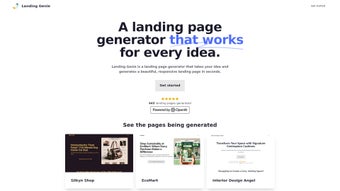
Landing Genie is an AI‑driven web application that promises to shrink the time‑to‑launch of a landing page from days to just minutes. Built for entrepreneurs, marketers, and small‑business owners, the platform removes the need for design expertise or heavy‑duty coding. By simply feeding the tool with basic project details—such as product name, target audience, and key benefits—Landing Genie instantly generates a responsive, conversion‑focused page that includes persuasive sales copy, a clear call‑to‑action, and a visual theme that matches the industry. Whether you’re promoting a SaaS solution, an e‑commerce store, a webinar, or a newsletter subscription, the tool offers ready‑made templates that can be fine‑tuned with your branding assets, color palette, and custom fonts. While it lacks deep custom‑code capabilities and advanced analytics, its core strength lies in speed, ease of use, and the quality of AI‑generated content. For teams that need to iterate quickly or launch multiple campaigns on a tight budget, Landing Genie delivers a practical, secure, and affordable solution that works directly in the browser, making it accessible on Windows, macOS, Android, and iOS devices. The service also complies with GDPR and CCPA, providing encrypted cloud storage for every project, which reassures users who handle sensitive lead data. In addition, the platform’s subscription model includes a generous free tier, allowing newcomers to test three landing pages per month without any credit‑card commitment. This combination of AI power, cross‑platform accessibility, and transparent pricing makes Landing Genie a noteworthy contender in the increasingly saturated landing‑page builder space.
Key Features that Power the AI‑Assisted Landing Page Creation
- AI‑Generated Copywriting: The built‑in language model crafts headline, sub‑headline, bullet points, and body text that are optimized for conversion.
- Industry‑Specific Themes: Choose from SaaS, E‑Commerce, Newsletter, Webinar, and more; each theme includes pre‑designed sections that adapt to your content.
- One‑Click Responsive Design: All pages are automatically mobile‑friendly and adjust to any screen size without extra configuration.
- Drag‑and‑Drop Layout Adjustments: Simple visual editor lets you reposition blocks, replace images, and tweak spacing in seconds.
- Integrated Media Library: Access royalty‑free images, icons, and video placeholders directly within the platform.
- Instant Publishing Options: Export your page as a live URL, embed code, or download HTML/CSS for self‑hosting.
- Secure Cloud Storage: All projects are saved securely on encrypted servers, ensuring data privacy and easy version control.
- Multi‑Language Support: Generate copy in several major languages, useful for global campaigns.
Beyond the headline features, Landing Genie continuously learns from user feedback, improving its copy suggestions and design recommendations over time. The platform also integrates with popular email marketing services (like Mailchimp, ConvertKit, and HubSpot) through simple webhook connections, allowing you to funnel leads directly into your existing workflows. While the tool does not yet offer built‑in A/B testing, you can duplicate a page and modify the copy or layout manually to run split tests using external tools such as Google Optimize. Another valuable addition is the “Smart SEO” toggle, which automatically adds meta titles, descriptions, and structured data tags based on the AI‑generated copy, helping you rank faster without manual SEO work. For agencies handling multiple client accounts, role‑based permissions let you assign “Designer,” “Copywriter,” or “Admin” roles, keeping collaboration organized and secure. Finally, the system’s export feature includes clean, minified HTML and CSS, making it easy for developers to integrate the landing page into custom CMS environments if deeper customization becomes necessary.
Installation, Compatibility, and Step‑by‑Step Usage Guide
Installation & Access: Landing Genie is a cloud‑based SaaS product, so there is no traditional download or installation required. Simply visit landinggenie.com, sign up for a free account, and you’re ready to start creating. The platform runs on modern browsers (Chrome, Firefox, Edge, Safari) and is fully responsive, meaning you can design from a desktop, laptop, tablet, or smartphone.
Compatibility: Because it is web‑based, Landing Genie works across Windows, macOS, Android, and iOS without any additional software. All you need is an internet connection and a compatible browser.
Step‑by‑Step Usage Instructions
- Create a New Project: Click “New Landing Page” and select a template category (SaaS, E‑Commerce, Newsletter, Webinar, etc.). The selection screen also shows a preview of each theme’s visual style.
- Enter Project Details: Fill in a short form with your product name, tagline, target audience, key benefits, and any specific value propositions. The AI uses this data to generate copy and layout suggestions that match the tone you indicate (e.g., professional, playful, urgent).
- Review AI Suggestions: The platform presents a fully assembled page. Review the headline, body text, and visual blocks. You can accept the copy as‑is, click “Regenerate” for alternative phrasing, or manually edit any element directly in the editor.
- Customize Design Elements: Use the drag‑and‑drop editor to move sections, replace images from the media library, or adjust colors to match your brand palette. You can also upload custom fonts or brand logos for a truly personalized look.
- Set Up Call‑to‑Action (CTA): Choose a button style, add your URL or form integration (e.g., HubSpot form, Typeform, custom HTML), and configure any tracking parameters such as UTM codes.
- Integrate Third‑Party Tools: From the Settings menu, enable integrations with Google Analytics, Facebook Pixel, or Zapier. Paste your tracking IDs or webhook URLs to start collecting data immediately after publishing.
- Publish or Export: Once satisfied, click “Publish”. You can either host the page on Landing Genie’s subdomain (e.g., yourproduct.landinggenie.com) or download the HTML/CSS files for self‑hosting on your own server or within a CMS like WordPress.
- Manage Projects: All pages are saved in your dashboard. You can clone, archive, or delete projects at any time. The version history lets you revert to previous iterations if needed.
For teams that require collaboration, Landing Genie offers role‑based access, allowing designers, copywriters, and marketers to work on the same project simultaneously. The platform also provides a simple “Export to PDF” feature for sharing mockups with stakeholders before going live. If you ever need to pause your subscription, the dashboard includes a one‑click downgrade or cancellation option, and all data remains stored for 30 days before permanent deletion, giving you ample time to retrieve any assets you may need later.
Pros, Cons, and Frequently Asked Questions
Pros
- Lightning‑fast page generation—usually under two minutes.
- No coding or design skills required; AI handles copy and layout.
- Responsive designs automatically adapt to all devices.
- Secure cloud storage with encrypted backups.
- Free tier available for testing; affordable paid plans for unlimited pages.
- Smart SEO toggle adds meta tags automatically.
- Easy integration with major email and analytics platforms.
Cons
- Lacks deep custom‑code injection for advanced developers.
- No built‑in A/B testing or detailed analytics dashboard.
- Template variety, while solid, is not as extensive as some premium builders.
- Exported HTML may require minor tweaking for complex SEO setups.
- Advanced features such as custom domain mapping are limited to paid plans.
FAQ – Answers to Common Queries
Is Landing Genie really free to use?
Landing Genie offers a free tier that lets you create up to three landing pages per month, complete with AI‑generated copy and basic publishing. Premium plans start at $9.99/month and unlock unlimited pages, custom domains, priority support, and advanced integrations.
Can I connect my own domain to a Landing Genie page?
Yes. Paid plans include the ability to map a custom domain (e.g., landing.yourbrand.com) to any page you create. You’ll receive DNS records to add to your domain registrar, and SSL is automatically provisioned for secure connections.
How does Landing Genie handle data privacy?
All user data is stored on encrypted servers compliant with GDPR and CCPA. The platform does not sell your information, and you can delete any project permanently from your dashboard at any time.
Is there any way to add custom analytics tracking?
While Landing Genie doesn’t provide a native analytics suite, you can embed any third‑party tracking script (Google Analytics, Facebook Pixel, Hotjar, etc.) by adding it to the page’s header through the “Custom Code” field available in premium plans.
Can I export the page for self‑hosting?
Absolutely. The “Export” button downloads a zip file containing clean HTML, CSS, and image assets. This allows you to host the page on any server, integrate it with your CMS, or further customize the code.
Does Landing Genie support multilingual landing pages?
Yes. The AI can generate copy in several major languages, including English, Spanish, French, German, and Portuguese. You can switch the language selector in the project setup to automatically receive translated headlines, body text, and CTA labels.
Structured Review Object
Overall Rating: 4.2 / 5
Pros: Fast AI copy, zero‑code design, responsive output, secure cloud storage, smart SEO, easy integrations.
Cons: Limited custom code, no native A/B testing, modest template library, advanced features gated behind paid plans.
Conclusion: Should You Download Landing Genie Today?
Landing Genie delivers exactly what its name promises—a magical, AI‑powered shortcut to professional landing pages without the usual learning curve. For marketers on a deadline, startups with limited design budgets, and anyone who wants to test ideas quickly, the tool offers a compelling blend of speed, security, and quality. The lack of deep customization and built‑in analytics may turn power users toward more advanced platforms, but the trade‑off is justified by the simplicity, affordability, and cross‑device accessibility of the service. If you’re ready to launch campaigns faster, focus more on strategy than on design, and benefit from AI‑generated copy that’s already optimized for conversion, click the “Get Started” button below, begin your free trial, and let Landing Genie generate your next high‑converting landing page in minutes.
Get Started with Landing Genie – Free Trial


.png)



